Home Office & Productivity Online Services Photos & Graphics

AWW App alternatives

Paid 21 alternatives

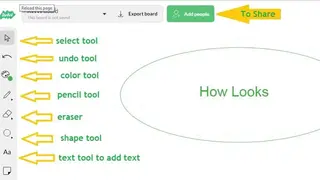
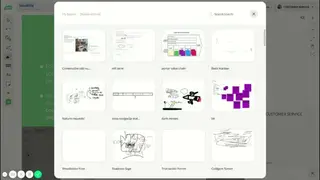
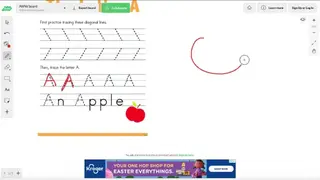
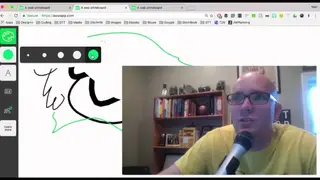
AWW App is a prominent collaborative whiteboard solution developed to fulfill education and businesses requirements. It is an efficient and effective replacement for smart boards. The best aspect is that it is compatible with all browsers and devices and doesn’t need extra hardware to run.

The aim is to help you get your thought across by means of drawings, Illustrations, and visual text. You can use the tool to work along with co-workers and other members of the team. Each member can participate in the discussions and share their opinions more easily by drawing figures on the screen. The benefit of using this tool is that you get the ability to communicate ideas and opinions via visual representations.

AWW App screenshotAWW App screenshotAWW App screenshotAWW App screenshot

Ranked alternatives

  1. 1
    LimnuFreemium

    Limnu is an online whiteboard collaboration solution that enables you to draw, share, and work alongside coworkers. It works just like a real whiteboard and enables you to sketch ideas with other collaborators instantly. The tool allows people to draw, brainstorm and solve problems together. It removes the complexities, enabling you to focus on the work.

    The product simplifies things for you and offers the tools essential for meeting online, brainstorming ideas, or video conferencing. It is easy to use and master, and you will be able to grasp its working in no time. There are no edge boundaries, and the space is large enough to accommodate huge ideas and a useful indicator to help you track them again.

    The solution aims to deliver the best experience to teams and, as such, provides them with a friendly environment to share workflows and ideas or play an enjoyable game of tic-tac-toe. Everyone can share their thought with anyone ranging from loved ones to family members to the Slack team. There is a Board Organisation feature that enables you to search, filter, and edit the whiteboards in bulk. Another great feature is the easy to handle drawing that is light on the fingers.

    Limnu alternatives
  2. 5
    BluescapeFreemium

    Bluescape is a virtual collaboration platform built to satisfy the expectations of hybrid teams. You can use it for breathing life into goals and meetings. The solution is ideal for reviews, kick-offs, presentations, and brainstorms. It allows you to think of creative ideas and act on them instantly. Get rid of screen sharing, and interact with team members in a better way. Meet deadlines by aligning production workflows, streamlining approvals, and decreasing review cycles.

    You can enhance collaboration across distributed teams and ensure a smooth and steady pace for fulfilling objectives. The product aims to fix painful problems for teams that require a visual layer for collaboration but aren’t happy with the redundant nature provided by a digital whiteboard app. Teams can use the state-of-the-art collaborative whiteboard to refine and brainstorm concepts. Each member can provide feedback by attaching comments, annotations, and sticky notes for clarity. You can offer and review several assets simultaneously. Other features of the platform include video conferencing, canvases and templates, present and review, rich content sharing, infinite canvas, and an online whiteboard.

    Bluescape alternatives
  3. 6

    Draw.Chat is an online whiteboard app that enables teams to sketch their ideas in a collaborative environment and resolve issues quickly by sending messages via the chat feature. It doesn’t charge cash, is easy to use, and is completely secure. The best aspect is that it is anonymous and protects the identity of the users. You can create a chat room with a single click without the need for registration.

    Each whiteboard comes with a special, distinctive URL that you can forward to teammates to work collaboratively. Another great feature is the support for video conferencing that allows you to use private and P2P Secure Audio to communicate with a large group without hassle. The platform assigns a 10 megabytes sketch board to everyone. This space comes in handy for uploading documents, WebP, SVG, JPG, PNG, PDF, and GIF. Lastly, all the projects are maintained on the site for 30 days, after which they are deleted.

    Draw.Chat alternatives
  4. 7
    WBOFree

    WBO is one of the prominent online whiteboard applications that is built to sustain collaborative efforts and team tasks. It enables many people to sketch on the massive whiteboard at the same time. The board is refreshed on the fly for everyone using it, and its state is maintained. You can use the tool for different scenarios like teaching, art, design, and entertainment.

    The best aspect is its ease of use, which allows everyone to collaborate on a drawing with others by the simple sending of a URL. The platform offers two board types, namely the public board and the private board. The public board is visible to everyone and is a disorganized mess that lets you hand out with random people and draw together. Each member has the option to create a private board with a unique name that will be accessible only by its URL. This option comes in handy for sharing sensitive data.

    WBO alternatives
  5. 8

    MultiDraw is a web-based chat and Paint app that allows multiple people to express their creativity in a collaborative environment. It is a responsive and best-in-class chat and Drawing app that is optimized for desktop and mobile devices. You can access the built-in SpeedPaint recorder that plays your collaborations for review purposes. There are several advanced features like touch gestures and pressure sensitivity.

    Everyone can easily share their personal information and details with random people by creating a private room. The solution gives you the ability to share private messages between rooms. Each room is protected by a password, which you can share through PM. The best aspect is that there are no limitations, and each member can invite as many friends as they want without hassle.

    You can begin a chat session with friends and family members to share photos, thoughts, YouTube videos, and more. Start by picking your favorite nickname and choose the desired avatar in no time. Become a part of the community of creative users from different countries in the world. Let people know about your creative abilities through Emojis. Upload the newest photos or share the precious YouTube Videos. Remove disturbing people, and send a private message to friends or invite different people to the drawing-room.

    MultiDraw alternatives
  6. 10

    Smoothboard Air is a collaborative, interactive whiteboard application for iPads and Android devices that revolutionizes interaction in lecture rooms. It instantly transforms multiple iPads and Android devices into interactive whiteboard surfaces.

    With the usage of a QR Code projected on the monitor, participants within the room can quickly scan and access the screen from their cellular gadget without installing any supporting installation. Smoothboard Air is a new collaboration program that allows the presenters to share the computer screen amongst a couple of individuals with cell gadgets reminiscent of iPads and Android devices.

    With the usage of a QR Code projected on the monitor, contributors within the room may scan and access the monitor from their mobile device without any app installation, which is made possible with HTML5 web browsers.

    Due to Smoothboard Air’s simplicity, new contributors may be invited to join and taking part instantly. Every cell device becomes an interactive whiteboard floor where each presenter and member could annotate on any utility concurrently.

    Smoothboard Air additionally enables remote desktop to manage straight from an iPad or Android tablet. The presenter or instructor may assign permissions for each participant to have entry to the annotation or remote manipulate functions.

    Smoothboard Air alternatives
  7. 12

    Movies with handwritten drawings that tell a narrative can conveniently rate five figures. However, VideoScribe software enables you to create these identical videos utilizing vector pictures – for not up to $50 per 30 days.

    Download the main whiteboard video program to your laptop and begin making animations within seconds. Add images, text, song, and voiceover to the canvas and VideoScribe will turn them into a whiteboard video for you. Opt for from thousands of photographs and soundtracks in our libraries or upload your own.

    You can change the heritage, use an eraser, move objects in, morph one photograph into an additional, add GIFs, pimp your video to perfection. This super-easy package deal allows you to make whiteboard variety animations, including portraits, text, voice, and song for a quite respectable conclude in a minute.

    The whole thing you ought to provide is your presentation and beat your competitors. Use a clean canvas and let your imagination take over or open ascribe from the VideoScribe computing device. VideoScribe magically draws your factors, turning them into an exciting video that you may share with the others. Create excessive excellent videos best for advertising, teaching, coaching, and imparting.

    VideoScribe alternatives
  8. 13

    RM Easiteach is a brand new and a popular interactive program for your classroom, for use on any whiteboard, projectors and other hardware devices. It is designed to support you create and give motivational and fascinating lessons. Easiteach allows users to create customized classes and resources from scratch as well as access a wide variety of content material that can be used or adapted to fit their wishes.

    Easiteach is best to support all classes throughout a broad range of topics and is priceless in any academic atmosphere, regardless of student age or capacity. Each lecturer and scholar can use Easiteach to create multi-modal movements that may include animation, video, sound, textual content, and flash documents all on one page.

    The software with no trouble available toolbars and widgets also permit you to work rapidly and successfully in creating entire-class educating hobbies to fit with your class finding out ambitions. Easiteach is an ongoing development and will likely be superior to a range of new aspects over time.

    There is a wide range of content provided inside Easiteach next generation that utilizes the functionality of the software and an excellent way to permit you and your scholars to fit objectives inside key subject areas successfully. Easiteach has a range of key elements, which make it the superb software application for whatever hardware your college could use for whole-class instructing purposes.

    RM Easiteach alternatives
  9. 14

    Open-Sankoré is a multiplatform, open-source software that is suitable for every type of interactive hardware. It’s translated into many special languages. Its range of tools is customized to all users: from newcomers to professionals. The Open-Sankoré program is a multiplatform, open-source software that is suitable for every variety of DIT.

    It is also translated into many languages and remains tailored to all customers: from newcomers to specialists. Furthermore, to being equipped to remark, draw, and highlight, the Open-Sankoré software gives you the choice of enriching your path content using importing flash animations, images, audio, videos, or with the aid of including existing.PDF or.PPT records.

    You can captivate your viewers with the aid of embedding dynamic content into your course: apps from widgets, Wikipedia, or Google Maps. The Open-Sankoré application additionally offers tools for the one-of-a-kind phases of a lesson: you could display only the essential section, with right instruments akin to dynamic display administration or limitless zoom, and so on.

    Open-Sankoré alternatives
  10. 17
    DoceriPaid

    Combine screencasting, computer manipulates, and an interactive whiteboard in one app, you’ll in no way flip your back to the class or viewers again. Create a lesson or presentation, insert portraits, shop, and edit your undertaking and file a screencast video you can with ease, keep, or share. Doceri does all of it!

    Decide on from six distinct pen styles plus picture strains and shapes. Set your dimension, opacity, and spacing, decide on from unlimited colors – or use the pre-set defaults for all settings. Use your finger or a stylus and creating a single page drawing, a multi-webpage presentation, or an animated sequence.

    Using Doceri Timeline authoring platform, every stroke of your finger or stylus is recorded. It can be replayed and edited in sequence or cut, copied, and pasted in other places within the venture timeline, making use of the lasso software.

    Any saved drawing will also be opened once more so that you could assess, edit and set stop aspects using the timeline to replay your drawings and annotations as they have been written or expose a section at a time.

    Once you’ve perfected your challenge, you can add an audio voice over to any section, or the whole task, pausing at any point and resuming recording while you’re in a position to move on.

    Doceri alternatives
  11. 18

    NotateIt creates private electronic ‘whiteboard’ or digital flipchart – right there for your laptop. Challenge you to explore your ingenious suggestions in a fully specific and bendy means. It can be a personal, digital, multi-web page whiteboard with a ‘magnetic’ persona, enabling you to drag and drop your notes and pix across the web page.

    It is handy and intuitive to make use of – that you can be ‘up and strolling’ as rapidly as viable, using all the potential you’ve and not losing time buried deep in a guide! Use NotateIt for word-taking, brainstorming, coaching, collating information, and an entire variety of alternative purposes in industry, schooling, or at dwelling.

    Size your entire handwritten notes, textual content, images, screenshots, and diagrams into NotateIt’s multi-web page flipchart workbooks. It also allows you to add hyperlinks to organize and use them extra simply that you can even make reveal recordings and playback your ‘movies.’

    Personalize your web page layouts with exclusive background photographs, including graph paper, lined paper, maps, or others. There are plenty of options to choose from within the free resource library. It offers you all of the free-layout flexibility of a paper flipchart or magnetic whiteboard; however, with the added improvement, you can save and distribute your outcome to make use of time and again.

    Either with or without an interactive whiteboard, this multi-web page whiteboard or flipchart software ” NotateIt” is real versatile software. From creating displays to brainstorming, from planning web page layouts to preparing resources for the schoolroom or only for organizing your notes, the purposes are so diverse.

    NotateIt alternatives
  12. 19

    With the new MimioStudio interactive whiteboard software, teachers have more significant flexibility and extra options for supplying fantastic studying that helps the Common Core State System(CCSS). The program involves element allow for collaborative learning in small agencies utilizing the MimioPad Wi-Fi pen devices and contraptions prepared with the MimioMobile application.

    This interactive whiteboard application developed for any technological information in the classroom and any educating form. Supports collaborative finding out for up to 50 people with the brand new, expanded collaborate feature.

    MimioStudio can also pause student sessions, share them in any blend on the entrance-of-the-class show, or conceal the entire courses. NEW ‒ join up to three cell instruments utilizing the MimioMobile app, free with any MimioStudio application or hardware license.

    Join every cellular device in the schoolroom with the purchase of an annual MimioMobile license. Teachers can create assessments with short-answer, brief-essay, and numeric scholar responses, getting ready students for upcoming original core assessments to utilize open-response test gadgets. The brand new expanded collaborate feature permits full lecture room for collaborative learning, with any mix of MimioPad devices and mobile devices walking the MimioMobile app.

    MimioStudio alternatives
  13. 20

    ActiveInspire empowers lecturers to convey classes to lifestyles using student interplay and collaboration on interactive whiteboards and interactive panels. Use its assortment of instruments, pix, and events to send courses to existence within the modern-day study room.

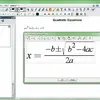
    Use ActiveInspire and deliver visually enticing and interactive lessons. The dual Interface will make you capable to readily swap between “important” for young beginners and “Studio” for older scholars. It helps with Mathematical Equations.

    The Equation Editor to add mathematical equations into a flipchart or questions or response options for learner response contraptions. Its built-in tools will allow you to give engaging classes to your front of the classroom display surface with Revealer, highlight focal point tools, Magic Ink, Clock, and Math instruments.

    Dual-user input, pen and multi-touch functionality (elegant for your display floor) motivate students to engage, interact, and work together. ActiveInspire is the best software for whiteboarding.

    ActiveInspire alternatives
  14. 21

    Twiddla is a real-time online collaboration tool. Its beauty is its simplicity and accessibility: no plug-ins or downloads, no workaround tricky firewalls, no developed scheduling. It’s to be had 24/7, and the only requirement is a computer with an internet connection and an online browser.

    It’s browser-agnostic, person-friendly, and usually, an extra enjoyable feature will make you able to enjoy your work. All you required to have an internet connection and your favorite web browser, and now you are allowed to enjoy all features of powerful whiteboarding. With this, you can easily create any video without any limitation.

    You can mark up this whiteboard layer and interact with the online web page while – all in real-time, with individuals from all over the place the world, which you can take a photo of your Twiddla session any time you like. That snapshot may also be exported as a photograph, became a widget for embedding into an online web page, or loaded again up in Twiddla for extra tweaking.

    Twiddla alternatives
  15. 22

    FlockDraw is easy to use of online whiteboard video maker software that comes with all of the tools you have to collaboratively sketch your next idea, and share it with the others. It is a fairly enjoyable free net app that’s simple to use.

    Just click on the start drawing a button on FlockDraw’s homepage, and a whiteboard opens up on your browser. Use the set of instruments in the sidebar to create traces, circles, text, or freehand drawings in any combination of the seven to be had colors. A URL is assigned to each drawing, so you can invite others to become a member of and draw with you in real-time.

    FlockDraw has plenty of priceless real-world applications—from faraway groups working collectively on tasks that want to doodle online with their kids as a way to reconnect while traveling.

    Give FlockDraw an attempt to let it know within the feedback how you would use this neat web app. FlockDraw is free to make use of an on-line whiteboard established painting & drawing instrument.

    It makes it easy to draw free with a couple of persons for fun or business. You can have limitless folks in a room and the drawing updates in actual time. It uses one of a kind colors, shapes, and text.

    FlockDraw alternatives
  16. 23

    EasyChalk is a web-based whiteboard application that runs on all boards, devices, interactive projectors, and other platforms. It can be utilized at any place, any time and with any hardware. EasyChalk makes use of the most recent net science (AJAX and HTML5).

    One of the best fact about this solution is that it is a cloud-based whiteboard and allow you to upload an unlimited amount of files without any limitation. As compared to all the other similar software, it is quite simple and not burdened with unnecessary functions. You are free to concentrate on your project, not the technology.

    EasyChalk alternatives
  17. 24
    WochitPaid

    Wochit is a cloud-based platform that allows companies to expand audience engagement through a video platform. It allows businesses to grow their vast array of video creation solutions. The platform’s Studio product empowers the marketers to create impactful videos with its cutting-edge technology and massive content pool.

    Wochit comes with unlimited content with millions of images and videos ready to be used, and its smart editing features take video creativity to the next level. The platform is entirely self-served for everyone and allows users to create video templates while giving clients a chance to edit those videos with embedded shortcuts. Wochit enables users to have excellent video creation experience and allows them to integrate video creation capabilities into their existing applications.

    Key features of Wochit are Collaboration tools, Customizable Branding, Media Library, Templates, and Social Sharing. Moreover, its Dynamic Wave scaling keeps the videos ready on time and allows users to use one video template for other videos for an unlimited time. The platform comes with paid services, while training is available online, and customer support is available via email and phone.

    Wochit alternatives
  18. 25

    Nero Video is a comprehensive software that allows users to edit videos and burn discs. The platform offers more than one thousand movie themes and effects to enable the users to unleash their creativity. Moreover, it also provides various templates to users to edit their videos, such as scary, colorful, or black-and-white.

    The software allows users to keep their audience engaged with countless effects, exciting transitions, keyframe animations, and many more. With its Express mode, users can edit their videos faster, and it offers a drag-and-drop feature to help users to turn their photos into a video story or complete movie.

    Nero Video also enables the users to stream all videos easily on their mobile, desktop, or TV, and users can easily transfer their videos from one device to another. Lastly, users can select any format for their videos and can easily turn it on discs.

    Nero Video alternatives
  19. 27

    WrittenUp is a suitable virtual whiteboard solution that aims to fulfill the diverse needs of hybrid teams. It is the best pick for remote collaboration and allows teams to think of creative ideas and work on fulfilling them in a way like never before. The site provides you access to all the essential features like presentation and review, tools for drawing, sketching, and giving feedback to others.

    You can quickly jot down and sketch on a virtual whiteboard and get your ideas across to the rest of the team. The best aspect is that the solution is compatible with handheld devices, enabling you to use it on PCs and tablets without hassle. Lastly, it features several pages and PDF exporting.

    WrittenUp alternatives
  20. 28

    Formgraph is a social network and vector drawing tool that enables you to draw with loved ones, family members, and others in a collaborative environment. It makes it easy for you to remix the products you already have. The product gives everyone access to a space to allow them to express thoughts and connect them together.

    It is a web-based solution and what makes it stand out from the crowd is its ability to collaborate and remix on the fly. The tool can be thought of as being identical to Muro from deviantART mixed with FlockDraw. Another tempting feature is the availability of a large number of brushes. Lastly, it performs perfectly fine with many browsers not having any plugins.

    Formgraph alternatives
  21. 29
    DeskleFreemium

    Deskle provides a suite of online whiteboards for instant team collaboration. It is an interactive virtual whiteboards solution designed to enable real-time visual collaboration for all teams, no matter their size. It allows you to insert screenshots with URLs, pictures, comments, sticky notes and videos, document files, mind maps, Kanban cards, and drawings.

    The space is unlimited, and you can sketch endlessly without any worries. This makes the solution a perfect pick for data visualization, brainstorming, project management, prototyping, and various other tasks. The solution is enriched with a wide range of features, and these include a Mind map, unlimited board size, activity history, responsive custom templates, interactive windows, interactive widgets, share on Pinterest, extraction of data from Wolfram Alpha, and data extraction from Wiki data.

    Deskle alternatives