Home Communication Office & Productivity
Surface Hub 2 alternatives

Paid 6 alternatives

Official website

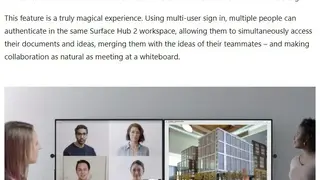
Surface Hub 2 is a team collaboration platform that allows you to hold meetings with a whiteboard and other productivity tools. It acts as a bridge between team members sitting remotely with powerful meeting and collaboration tools. It supports a 4K web camera with full-quality video streaming quality and an unlimited number of meeting members. Whiteboard feature allows for team brainstorming and sharing digital assets across platforms. Operate other apps during the meeting and collaborate in a live session.

Surface Hub 2 scales and adapts to your space through tiling up to 4 screens together in portrait or landscape view. Dynamic rotation allows you to use the best orientation for your content to help people work in the way that best suits them and the people they are collaborating with. All in all, Surface Hun 2 is a great platform that greatly increases your productivity.


Surface Hub 2 screenshotSurface Hub 2 screenshotSurface Hub 2 screenshotSurface Hub 2 screenshot

Ranked alternatives

  1. 2

    Cr4yon is an online and advanced whiteboard that provides the same feel as the real-life whiteboard for the sake of collaborative drawing with ease. It allows you to quickly and efficiently draw the sketch and add text, including HTML canvas. It has a simple drawing interface that gives the necessary and advanced tools to draw your design with pen touch support.

    The tool is available on desktop and mobile platforms such as android and iPad. It is compatible with the small and large-sized businesses to scale up the collaboration with an online whiteboard. The tool’s main focus is to provide access for remote teams to work on a single page efficiently.

    The main and top features of Cr4yon include design tools of basic functionality and built-in advanced options, quick setup with simple steps, export board online, multi-colors facility, and many more. It allows you to access the whiteboard interface with simple logging in. It also gives tips to use the tool better during the drawing.

    It is a free tool with multi-functions such as offering you to title your work to convert your initial idea into a professional drawing. It improves productivity by providing a one-page and straightforward interface solution.

    Cr4yon alternatives
  2. 3
    IDrooFreemium

    IDroo is an online educational whiteboard solution that provides instant and real-time collaboration with the help of your browser. The tool connects online students and teachers across the world. It gives you an editable and freely whiteboard, including freehand, documents, formula & equation facility as well. The tool allows you to upload images and other documents with a simple drag-drop to board as well as pasting ability.

    IDroo uses digital paper that enables you to use infinite and all directions of the page with endless ink. There are many prominent features of IDroo, such as the number of choices for online tutors and teachers, professional and straightforward equation editor with formulas, Lock the background to protect from moving or deleting vector graphics and many more. It offers keyboard shortcuts and there is no download or installation required.

    The tool has an integrated chat feature that saves the whiteboards to avoid message loss. It allows the board owner to change the default permissions for newcomers to keep the board private and protected. The tool offers free and straightforward pricing plans to upgrade features.

    IDroo alternatives
  3. 8
    ScribblarFreemium

    Scribblar is an advanced virtual whiteboard solution that allow you to share images, play video, live audio and the facility to upload the documents form websites with ease. It is an online collaboration tool designed especially for teachers and tutors but it can integrate with the third-party website and companies for the sake of connecting team members with each other.

    The tool provides multi-user collaboration where multiple members can upload and download documents and images easily. It allows the many chat features such as voice and text chat that is suitable for presentation and collaborative online meetings and you can access the features with the help of tablets and phones.

    There are many prominent features of Scribblar, such as real-time multi-user whiteboard, crystal clear live audio facility, text char with user list, no session or user limit, and many more. The tool supports the online training & tutoring, revising artwork and images with the creative brainstorming, and handles interviews and test efficiently.

    The tool offers a free trial with limited features and secure pricing plans to unlock pro features such as white-label integration, add your own logo & branding, integrates with existing users etc. Scribblar provides an interactive interface that enables you to export the images form your computers with drag-and-drop.

    Scribblar alternatives
  4. 9

    Whiteboard Team is an advanced and online whiteboard that allows you and your team to work and stay on a single page to scale up the efficiency. It gives real-time support which helps you to share your changes with other participants within seconds. It can handle the visual feedback that enables you to collaborate with ease to increase productivity.

    Whiteboard Team supports the infinite zoom-able canvas including the sticky notes and basic shapes to share your idea or thought in visual form. The tool uses for the sake of presenting something in batter way, brainstorming, planning of business, marketing purposes, and more. It can save your work by creating multiple boards and you don’t need to take a photo of the existing board.

    The core features of the Whiteboard Team include sharing & inviting teammates on your board support, no need to leave the board while chatting with teammates, works with the advanced browser & avoid installations, and many more. The tool is entirely free and no registration required to use the features.

    The tool offers the multiple templates to use the built-in support according to your needs such as business model canvas, minutes of meeting to create records, SWOT analysis template to plan techniques, calendar and daily stand-up templates as well. It also has a pros vs cons feature that enable you to draw the advantages and disadvantage of some specific decision.

    Whiteboard Team alternatives
  5. 12
    DeekitFree

    Deekit is an online whiteboard solution designed to share the work with remote teams with ease. It is available with the desktop as well as a mobile platform such as iPad and android. It is compatible with the small and large-sized enterprises to scale up the efficiency and productivity of businesses with remote access designing tools.

    The main goal of the tool is to connect people to make online collaboration easy and visual. It consists of millions of notes, writings, and drawing for the sake of built-in availability of components. One of the core features of the tool includes exporting the boards where you can export your board as an image and share this image with the help of the auto-generating link.

    Deekit allows you to access the board quickly with setting up your deekit account and check your inbox for an invitation after that click the ‘join now’ then choose the desired provider for logging in. The tool focus on the security and safety of online collaboration to improve authenticity and efficiency.

    It is a free tool with multiple features such as many built-in templates, basic options to sketch and create designs, shape library support, display and erase facility, pen color option, and many more. It supports integration with third-party apps and offers to share your work using multiple social media platforms.

    Deekit alternatives
  6. 13

    Whiteboard Fox is an online and advanced whiteboard that allows you to create quick sketches and share a virtual whiteboard with team members in real-time. It is a simple and easy-to-use solution that enables you to sketch within a minute. The share link will automatically appear; you can send links to your co-workers to increase productivity and work efficiency.

    The tool can combine anti-graffiti and scratch-resistant materials to create the proper sketch for you. The tool allows you to use the whiteboard features to sketch your idea without any installation issues, and there is no need to create an account to get started. It provides fast sync facility to relay the changes you make with other participants in no time.

    The core features of Whiteboard Fox include conformation on the clear, handling the cursor that trails anyone while drawing, pen color white that acts as a simple eraser, shape drawing circles/lines or rect easily, and many more. It supports the pinch-to-zoom gestures to sketch using a stylus pen that shows the tablet-friendly features.

    The tool allows the creation of whiteboards such as ’Only Myself’ for individual work and ‘Any Participant’ for teamwork. The Whiteboard has many advanced options to design sketches, such as Zoom In/Zoom-out, Snapshot ability, Ruler support, Replay to view previous work, and other essential operations.

    Whiteboard Fox alternatives