WhatsApp Desktop alternatives
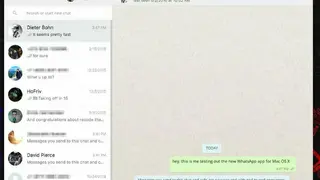
WhatsApp is a free messaging application that uses an internet connection to send and receive messages. Although you can use on the web and smartphone, WhatsApp has now launched a desktop application for both Windows and Mac operating system in order to deliver a complete experience.
This new desktop version of the application will be great for some users, as it now needs to take up any space in your web browser. Basically, the app works as an extension of your phone and offers mirror messaging and conversation to your device. It comes with many new features including native desktop notifications and better keyboard shortcuts.
To enjoy its service, you simply need to install the app into your desktop, sign in with your numbers and enjoy it all features without any limitation. You can send and receive photos, video, location, make video and audio call as well as create group chat just like the mobile version. It is worth noting that since the desktop solution uses your mobile device to sync messages, it would probably be best to ensure that it is connected to Wi-Fi to avoid excessive data usage.